Limited-Time Special Offer: Get Exclusive Lifetime Deal Now!
SaaS Customer Onboarding Template
Welcome to the SaaS onboarding template that ensures an effective and smooth customer onboarding process.
Get Started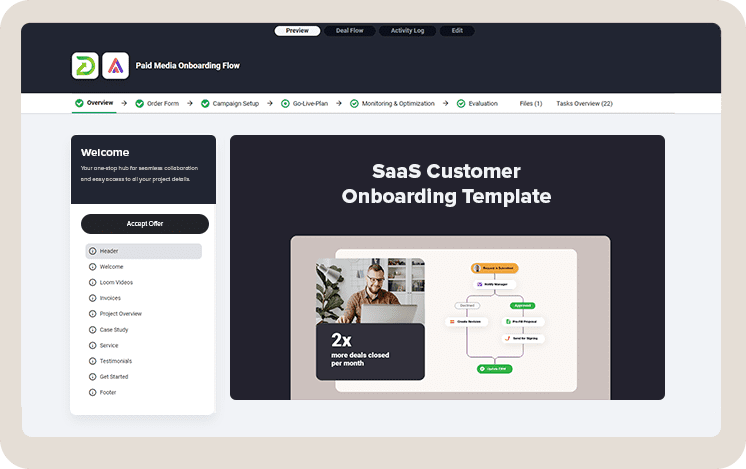
This SaaS customer onboarding template serves as a blueprint for overcoming common onboarding challenges. The main goal of this template is to help your company onboard more customers in less time, increase the adoption rate, and accelerate the time to value for new clients.
Standardizing the onboarding process is an important step in a SaaS business.
Mapping each step in a client's journey can save you time and help you better understand bottlenecks in your business.
Goals of using onboarding template:
- Reducing time-to-value for new customers
- Providing clear and actionable steps for customers to achieve early success with the software
- Aligning the onboarding experience with the expectations set during the sales process
- Increasing key feature adoption rate
- Consistent and high-quality experience for all customers
- Improved retention
What is The Challenge: Onboarding More SaaS Customers in Less Time with High Adoption Rates
Without clear action steps for onboarding new clients, the process can become inefficient and challenging, leading to a low adoption rate and slow growth of the customer base.
It's crucial to establish a seamless onboarding plan to ensure customers feel supported and valued from the moment they decide to commit. Minimizing confusion and enhancing their overall experience is important for a high adoption rate.
Most common challengies during SaaS onboarding process:
- Not providing the right information at the right time for customers to start using the system.
- Failing to identify and address the main pain point for the buyer first.
- Assuming all customers have the same level of technical proficiency.
- Not establishing next steps in a mutual action plan.
- Skipping follow-up steps to ensure customer satisfaction and full adoption.
- Overloading customers with too much information too quickly.
- Failing to clearly define and communicate the onboarding process to customers.
- Overlooking the need for continuous support and guidance after onboarding.
- Not collecting or acting on feedback during and after the onboarding process.
Solution: Structured SaaS Customer Onboarding Process
Whether you're looking to streamline your onboarding process, enhance customer satisfaction, or reduce time to value, this template offers the structured approach and best practices you need to achieve your goals.
The SaaS onboarding template provides a structured customer onboarding roadmap, tackling the usual troubles in the onboarding process and making everything from the first login to becoming a pro user clear and straightforward.
Centralizing client collaboration significantly enhances user experience. Creating a single, unified portal for communication and resource sharing eliminates the uncertainties often found in the early stages of user onboarding.
This template makes all necessary information, including onboarding documents and training materials easily accessible to both your team and the client. It creates an environment of open communication and collaboration, leading to a quick and effective user onboarding process.
SaaS onboarding template will help you with:
- Reducing onboarding complexity
- Mapping timelines and stakeholders
- Creating project mutual action plan
- Implementing engagement strategy
Included best practices for efficient SaaS customer onboarding:
- Reducing onboarding complexity
- Mapping timelines and stakeholders
- Creating project mutual action plan
- Implementing engagement strategy
Easily Customize Customer Onboarding Process
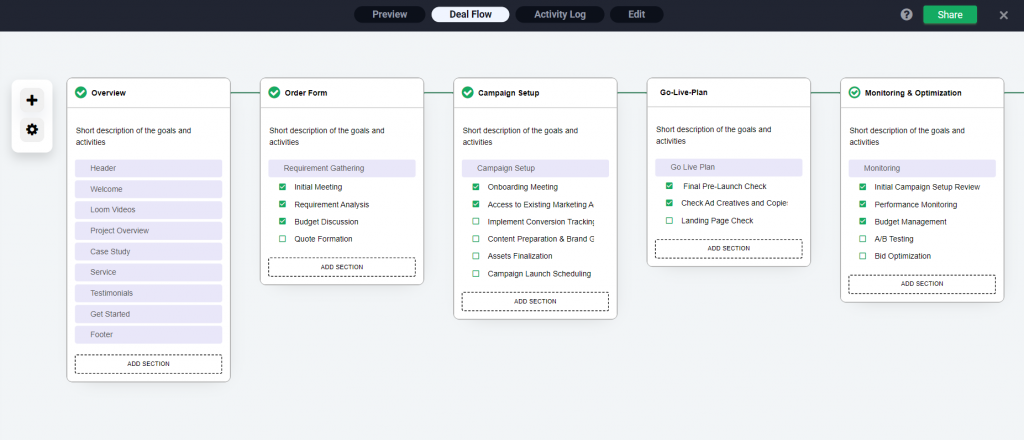
Benefits of Using This Template
Using this SaaS Onboarding Template offers many benefits, making the onboarding process smoother and more efficient, which leads to happier customers and faster growth.
Reduced Time to Value: Customers can realize the benefits of your SaaS offering faster, thanks to a clear, concise onboarding process. We use ready-made presentations to make this phase easier for clients.
Better Adoption and Engagement: A better adoption rate comes from making sure customers get and use your product right from the start. We make this phase easy for customers by offering setup details, a knowledge base, and step-by-step guides.
Quicker Conversion to Paid Customer: To accelerate this phase, it is key to swiftly address the customer's main pain point, ensuring they quickly recognize the value of your service. This template offers a checklist on how to identify the main pain point during the initial kickoff call with the client. With the right data, prioritizing the implementation of the most important solution becomes easier.
Save Time on Repetitive Tasks: Automating repetitive tasks can drastically accelerate the onboarding of new clients and save you a huge amount of time.
Onboarding More Customers In Less Time: All this enables you to be more efficient, onboard more customers and grow faster.
Map Your Onboarding Process, Always Know What is The Next Step
Establish a collective action plan with your buyers to navigate the process to its final stages faster.
SaaS Onboarding Template: From Welcome to Go-Live Plan
Explore how this template can refine your SaaS onboarding process and deliver a seamless and professional introduction to your software.
What is In This Template?
- Welcome the Client
- Kickoff Meeting (Onboarding Questionnaire Included)
- Account Setup
- User Training
- Go-Live-Plan
This template serves as a guide to ensuring a well-organized transition for new clients from initial sign-up to product adoption.
It details each phase of the process, from the initial kick-off call to the Go-Live Plan, monitoring and process optimization.
Phase 1: Welcome the Client
Initial message should include a personal greeting, an overview of what the client can expect and the next step. This stage sets the tone for the entire relationship and begins the journey to full product adoption. .
TIP: Tailor the welcome message and initial communications to the client, showing an understanding of their business and needs.
What to include in client welcoming package:
- Personal greeting
- Onboarding overview
- Immediate value demonstration
- Calendar for scheduling an initial meeting
- Helpful resources
- Call to action for next steps
Immediate Value Demonstration: Include a quick win or an immediate value in the welcome phase, such as a useful feature they can start using right away.
Scheduling Kick-Off Meeting: Arrange a kick-off call to discuss goals, expectations, and how to navigate the onboarding process.
Provide Helpful Resources: Give access to resources such as user guides, FAQs, or tutorial videos that the client can refer to independently.
TIP: Welcome package can be standardized so you do not have to create it for each client. DocsCube can help you to create a customer onboarding template and launch it for each new client in just one click.
Phase 2: Kick-Off Call
The kick-off call serves as the first official meeting. The goal of this meeting is to align goals, expectations, and plan the journey ahead. This call ensures both parties are on the same page.
Advices for this phase:
Engage All Relevant Stakeholders: Ensure that all key players from the client’s side are on the call, as well as the relevant team members from your side.
Prepare in Advance: Prior to the call, gather as much information about the client’s business and needs as possible to make the discussion more relevant and productive.
Follow Up with a Summary: After the call, send a summary of what was discussed, including any decisions made and next steps, to keep everyone aligned.
Goal Alignment Plan
Preparing a client questionnaire ahead ensures that all crucial information is collected, facilitating a more productive and focused discussion.
This preparation helps in understanding the client's expectations, challenges, and the specific outcomes they wish to achieve.
Here's a list of questions to ask during the kickoff call for SaaS customer onboarding.
Onboarding Questionnaire
- What are your main goals for using our service?
- Can you describe the primary challenges you hope our solution will address?
- Who will be the primary users of our platform within your organization?
- What does success look like to you after implementing our solution?
- Are there any specific metrics or KPIs you aim to improve with our service?
- What is your timeline for achieving these goals?
- Do you have any concerns or potential obstacles you foresee in this process?
- How do you prefer to communicate and receive updates during the onboarding process?
- Who else in your organization should be involved in the onboarding process?
- Is there any other information you believe is crucial for us to know?
TIP: It's crucial to pinpoint the client's main pain point they wish to address first. Understanding this early on allows you to tailor the onboarding process to tackle their most pressing challenge, ensuring a focused and impactful start to your partnership.
Phase 3: Account Setup
The account setup phase is where the groundwork for your client's success with your SaaS product is laid.
This step involves configuring the client’s account to match their specific needs and preparing it for active use.
Here are the typical activities involved in this phase:
- Creating the Client’s Account: Set up the client's account with the necessary access rights and permissions.
- Customizing Settings: Adjust settings and preferences according to the client's requirements and the earlier discussions about their goals and pain points.
- Data Migration: If the client is transitioning from another service, assist with migrating their data into your system.
- Integration with Other Tools: Set up integrations with any other tools or services the client uses to ensure a seamless workflow.
- User Creation and Permissions: Add users from the client's team to the account and define their permissions based on their roles.
Phase 4: User Training
The goal of this phase is to ensure that the client's team is well-equipped to utilize the software to its fullest potential. Effective training can significantly enhance user adoption and satisfaction.
Here are the typical activities involved in this phase and best practices for delivering impactful user training:
- Training Materials: Provide training guides, videos, and other resources tailored to the client’s specific use cases and workflows.
- Interactive Learning Opportunities: Include hands-on exercises or simulations that allow users to practice using the software in a controlled environment.
- Scheduling Training Sessions: Organize live training sessions or webinars that cover essential features and functionalities of your software.
- Q&A Sessions: Allocate time for users to ask questions and clarify doubts, ensuring they feel confident in using the platform. Include this data into your onboarding help center.
TIP: Tailoring the training to address the client's main pain points demonstrates a deep understanding of their needs, fostering a stronger partnership.
Phase 5: Go-Live-Plan
In this phase clients start to actively use the software in their day-to-day operations. This phase involves final preparations and support structures to ensure a smooth transition to regular use.
Here are the key activities involved in the paid media campaign setup phase:
- Finalizing the Setup: Ensure that all account configurations, customizations, and integrations are complete and functioning as expected.
- Establishing a Go-Live Date: Agree on a specific date and time to officially start using the software, allowing for any final preparations.
- Develop a Contingency Plan: Have a plan in place for addressing any unexpected issues that may arise during the go-live phase.
- Gather Immediate Feedback: Collect feedback from the client during and after the go-live phase to understand their experience and any immediate improvements that can be made.
TIP: Celebrate the Milestone: Acknowledge the effort and collaboration it took to reach this point, celebrating the beginning of a new phase in the client’s operational workflow.
Key Takeaways
What is in This Template:
This template is created to address SaaS customer onboarding challenges and help you with transition from new customer to proficient users, ensuring clarity and ease at every step.
SaaS customer onboarding template includes:
- Welcome the Client
- Kickoff Meeting
- Onboarding Questionnaire
- Goal Alignment
- Account Setup
- User Training
- Go-Live-Plan
How to Use this Template
Setting up this template is both easy and quick, requiring just a few minutes of your time. With a straightforward process, you can have it ready and tailored to your needs.
- Set up your SaaS customer onboarding process in minutes
- Customize onboarding process steps easily
- Assign tasks internally and externally
- Boost onboarding effectiveness with workflow automation
Who This Template is For?
This template is designed for professionals involved in saas customer onboarding processes, particularly within the SaaS industry. It's perfect for customer success managers, onboarding specialists, and sales teams who aim to provide new clients with a smooth, efficient introduction to their services.
Ideal for both small startups and large enterprises, it's a versatile tool that can be adapted to fit a wide range of business needs and customer scenarios.
- Customer Success Managers
- Onboarding Specialists
- Sales Representatives
- Account Managers
- Product Managers
- Marketing Professionals
- Project Managers
- Training and Development Coordinators
Set up your customer onboarding template in just a few minutes!
Boost your sales with our easy-to-use portal software. Bring your team and clients together on one platform where everything they need is just a click away.
80%
Less time spent on onboarding materials creation
Portal Builder
Custom Forms
Tasks & Boards